
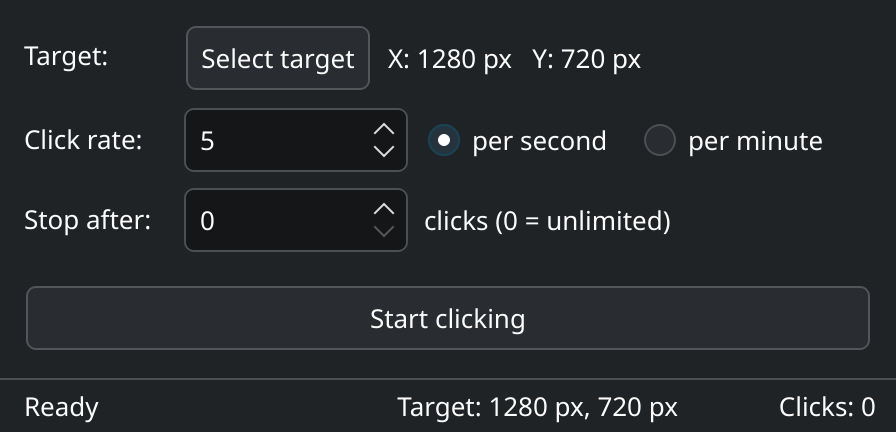
Small, and out of your way
One window with three settings. It stays on top while you work and never fights you for the mouse.
Pick the target with a crosshair
The screen dims and a crosshair with live coordinates appears – across all your monitors.
Any rate you need
1–50 clicks per second or 1–600 per minute. Switching the unit converts the value for you.
Stop after N clicks
Set an exact number of clicks, or leave it at 0 to click until you move the mouse.
Move the mouse to stop
The moment the pointer leaves the target, clicking ends. No hotkey to remember.
2-second countdown
Time to let go of the mouse before the first click. Clicking the countdown cancels it.
No setup, no root
Runs with normal user permissions. Speaks English and German, following your system language.
Five steps
After every start the rate is set to 5 clicks per second.
- Select targetClick the button, then click the spot.
Esccancels. - Set the rateEnter a number and choose per second or per minute.
- Stop afterOptionally limit the number of clicks.
- Start clickingKeep the mouse still during the countdown.
- Move the mouseThat's it – clicking stops right away.
The pointer jumps to the target on every click. The target is intentionally not saved and has to be picked again after each start.
Install
The AppImage bundles all Qt libraries. Download it, make it executable, run it.
AppImage
Get the latest release, then:
$ chmod +x Autoclicker-*-x86_64.AppImage
$ ./Autoclicker-*-x86_64.AppImage
Runs on systems with glibc 2.41 or newer, for example Arch, CachyOS, Fedora 42, openSUSE Tumbleweed, Kubuntu 25.04 and Debian 13.
No FUSE on your system?
$ ./Autoclicker-*-x86_64.AppImage --appimage-extract-and-runThe AppImage uses Qt's “Fusion” style instead of KDE's Breeze. Everything works the same.
Build from source
Needs CMake, Qt 6 and LayerShellQt. On Arch / CachyOS:
$ sudo pacman -S --needed base-devel cmake qt6-base qt6-wayland qt6-tools layer-shell-qt$ git clone https://github.com/dlehmann/autoclicker.git $ cd autoclicker $ cmake -B build && cmake --build build -j $ sudo cmake --install build
Packages for Debian and Ubuntu are listed in the README.
/dev/uinputUsually already set up on KDE, e.g. by KDE Connect or Steam. Check with getfacl /dev/uinput | grep "user:$USER".How it works
Written in C++ with Qt 6. The KWin scripts are loaded on start and removed again on exit.
| Sending clicks | A virtual pointer device via /dev/uinput with absolute coordinates – works in every application, including on Wayland. |
|---|---|
| Selecting the target | A semi-transparent overlay per monitor using LayerShellQt. |
| Detecting movement | A KWin script reports via D-Bus as soon as the pointer leaves the target. |
| Always on top | A KWin script sets “keep above others” for the app's own window. |
| Timing | A dedicated thread with a fixed rate. Buttons are held for 50 ms, at high rates for at most a quarter of the click interval. |